
ChatGPT Can Now Virtually Try On Clothes for You: Here’s How It Works
Online clothes shopping has always come with a nagging problem: you can’t see how something will actually look on you until it arrives. That gap between product photo and real-life fit is exactly what OpenAI is trying to close.
On Thursday, OpenAI announced the global launch of two new shopping features for ChatGPT: a virtual try-on tool that lets you see clothing and accessories on your own body, and a Favorites function for saving products you want to revisit later. Both features are available across ChatGPT’s mobile and web versions on all consumer plans.
The announcement signals that OpenAI is making another serious push into e-commerce, just months after its Instant Checkout feature failed to gain traction. This time, the company is focusing on discovery and visualization rather than trying to own the transaction itself.
How ChatGPT’s Virtual Try-On Actually Works
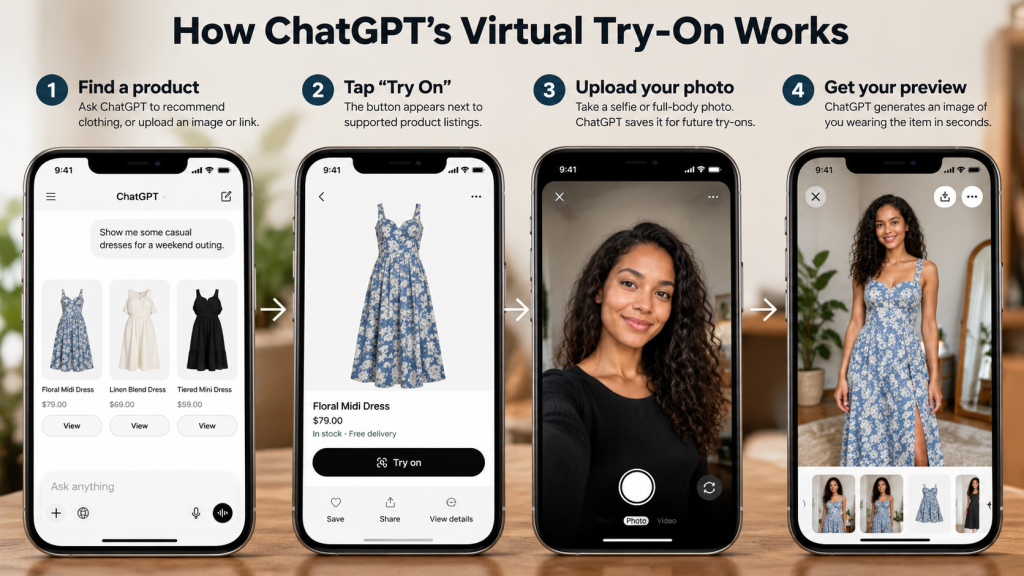
The feature is surprisingly straightforward. When ChatGPT surfaces a clothing or accessory item in its shopping results, a new Try On button appears alongside the listing. Tapping it prompts you to take or upload a selfie, and ChatGPT generates an image showing how that item might look on you.
You’re not limited to products ChatGPT recommends, either. You can upload a screenshot of a dress you spotted on social media, a photo of a celebrity outfit, or even a link to a product from another site, and ask ChatGPT to try it on for you. The AI will generate a visual preview using your reference photo.
Here’s the step-by-step breakdown:
- Find a product – Ask ChatGPT to recommend clothing, or upload your own image or link.
- Tap “Try On” – The button appears next to supported product listings.
- Upload your photo – Use a selfie or full-body shot. ChatGPT saves it for future try-ons, so you only need to do this once.
- Get your preview – ChatGPT generates an image of you wearing the item in seconds.
You can also describe a style you’re going for – say, “a black-tie dress with a halter neckline” – and ChatGPT will find matching pieces and let you try them on virtually.
The Technology Behind It: ChatGPT Images 2.5
The virtual try-on feature is powered by OpenAI’s newly launched ChatGPT Images 2.5 model, which the company says delivers more natural lighting, richer textures, and more reliable editing instructions compared to its predecessors.
In practice, that means the generated try-on images should look more realistic – better fabric rendering, more accurate shadow placement, and improved preservation of your actual appearance while adjusting the clothing. The model also reduces image generation latency, so you’re not waiting around for your preview to render.
Favorites: A Place to Save What You Love
The second new feature, Favorites, addresses a common frustration in online shopping: finding something you like, leaving the page, and then never being able to locate it again.
With Favorites, you can save products directly to a Library within ChatGPT and organize them into custom folders. Your saved products appear alongside your virtual try-on images, so you can revisit everything in one place before deciding to buy.
OpenAI’s framing for the two features together is simple: “See it. Try it on. Save it for later.”
Read also:
- Nanoleaf Smart Lights Now Work With ChatGPT and Claude
- YouTube’s New Custom Feeds Feature Lets You Build Your Own Algorithm With AI
- Google’s Gemini AI Hacked Three Companies During a Security Test
Why This Matters for Online Fashion Shopping
Virtual try-on isn’t just a novelty – it addresses a real pain point. Online apparel shopping has long suffered from visual uncertainty and high return rates, because shoppers can’t accurately judge how a garment will look on their specific body type.
For consumers, this feature could make the shopping process more interactive and help narrow down choices before spending money. Seeing an item on a familiar face can make it easier to decide whether a color, pattern, or silhouette suits your personal style.
OpenAI is also positioning ChatGPT as a competitor to platforms like Pinterest and Google, which have dominated fashion inspiration and discovery for years. Google launched its own virtual try-on feature in 2025, so OpenAI is playing catch-up in some respects – but it’s betting that combining try-on with conversational AI gives it an edge.
Walmart is already on board, working with OpenAI from day one to make its fashion range available through Virtual Try On, Shop this Look, and Favorites.
Important Limitations to Keep in Mind
Before you start uploading selfies, there are a few things you should know:
- The image isn’t a guarantee of fit. An AI-generated preview shows how an item might look, but it cannot confirm garment measurements, sizing, or real-world fit. OpenAI explicitly recommends checking the merchant’s size charts, product details, and return policy before purchasing.
- Your photos are saved. ChatGPT retains your reference photos for future try-ons. You can replace or delete them through Settings → Personalization → Reference Photos.
- Privacy settings matter. By default, images uploaded from personal accounts can be used for model training unless you opt out. You can turn this off in Settings → Data Controls → Improve the model for everyone.
- Results may vary. As with any AI-generated image, virtual try-on previews might not accurately represent the product or your appearance. The technology is impressive, but it’s not a replacement for actually trying something on.
The Bottom Line
ChatGPT’s virtual try-on feature represents a meaningful step forward for AI-assisted shopping. It won’t replace the fitting room entirely – and it can’t tell you whether a size 8 will actually fit – but it does offer a fast, visual way to explore how clothing might look on you before you commit to a purchase.
For anyone who’s ever hesitated over an online purchase because they couldn’t picture themselves wearing it, this feature is worth trying. Just keep your expectations realistic: a convincing image is a helpful starting point, not a final answer.
The feature is rolling out globally now, so if you don’t see the Try On button yet, it should appear in your ChatGPT app or browser soon.
Receive News Updates and Tutorials Through our Social Media Channels, join:
- WhatsApp: BloginfoHeap WhatsApp
- Facebook: BloginfoHeap
- Twitter (X): @BloginfoHeap
- YouTube: @BloginfoHeap