Ever wondered what happens behind the curtains of your favorite websites and apps? Not magic – software engineering happens! Let’s take this amazing journey and demystify the art of creating digital marvels, excavating the complex layers that power modern software.
What Is Software Engineering, Really?
Think of software engineering as the design and building of the world of bits and bytes. It’s not merely coding; it’s the practice of applying engineering principles to produce robust, effective, and manageable software. Like civil engineers build bridges and architects build buildings, software engineers build the digital framework that governs our lives.
Picture constructing a house:
You wouldn’t simply begin laying bricks without a strategy, would you? That is where planning and analysis take place. You would have to research the terrain, what the residents would require, and what materials are accessible.
You’d require blueprints to determine the structure and function—that’s the design stage. Those blueprints would specify every detail of the house, from the foundation to the rooftop.
And you’d certainly want to check the house for defects—that’s quality control. You’d look for structural soundness, electrical safety, and working plumbing.
Software engineering follows the same steps, just for computer products! We don’t build with bricks and mortar, but with code and data.
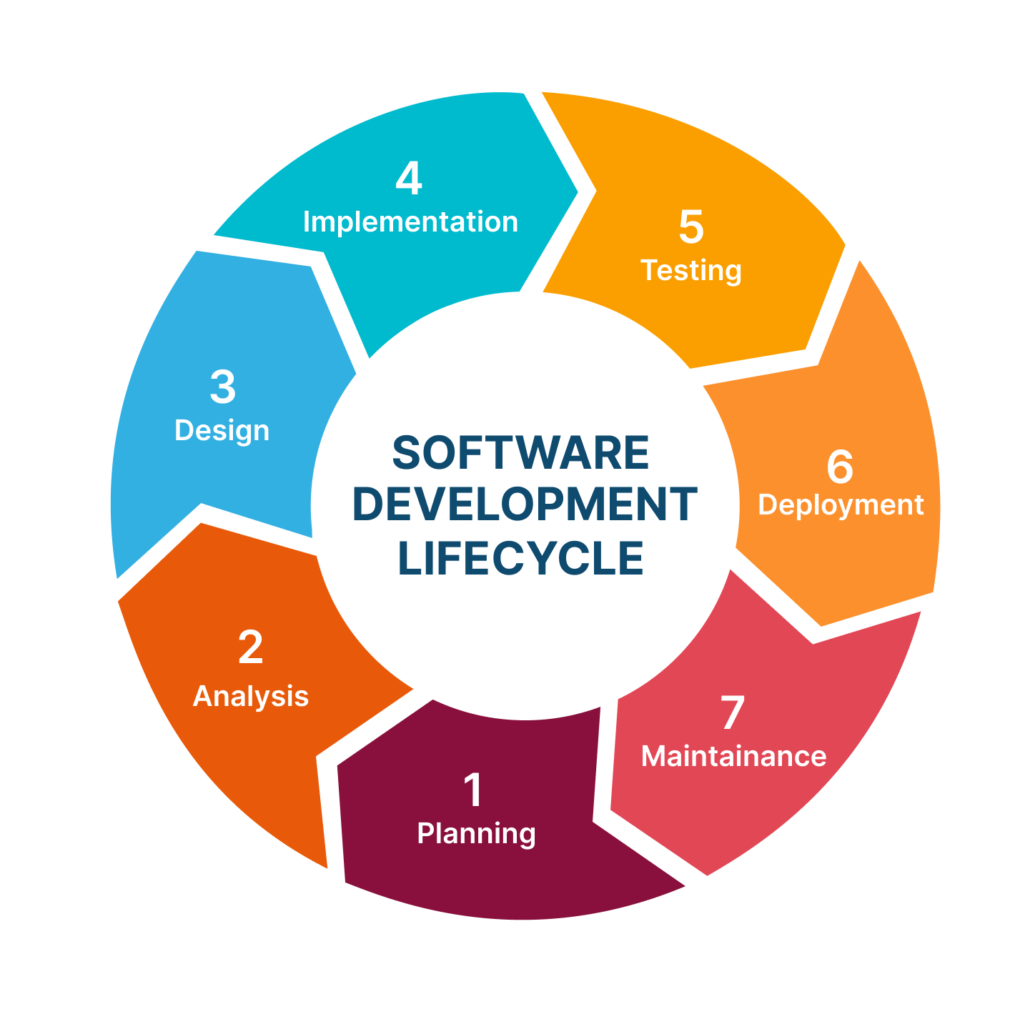
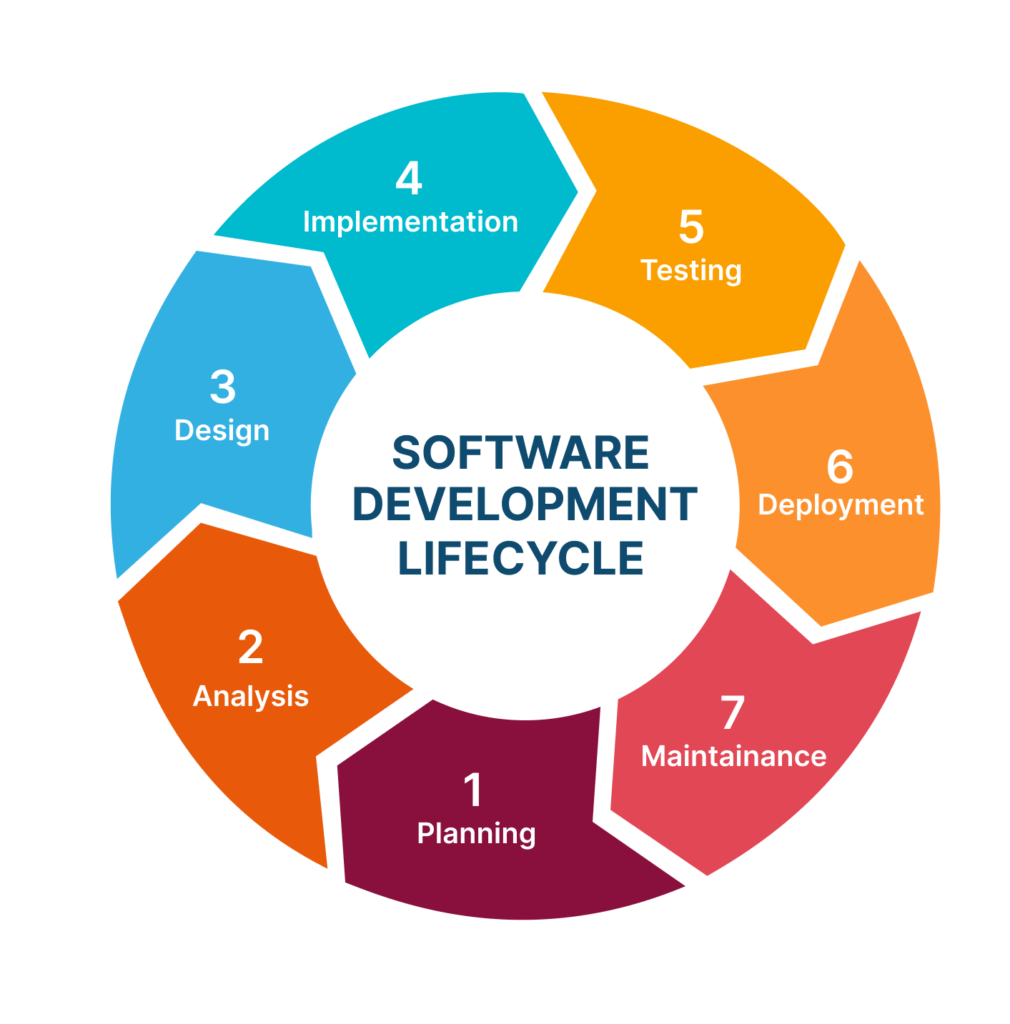
Let’s analyze the important phases:
- Planning: Defining project objectives, resources, and timeline. In this phase, one gets acquainted with the problem to be addressed, audience, and also the project constraints.
- Analysis: Gathering and analyzing the user’s requirements. This involves understanding the needs and wants of the users from the software, and translating them into concrete features and functionality.
- Design: Developing the architecture and fine details of the software. Here is where the overall picture of the software is established, along with the details of each component.
- Quality Control: Bug testing and verifying that the software is up to standard. This includes all forms of testing, from unit testing to user acceptance testing, to verify that the software is stable and functions as required.
Interactive Question: What’s the most frustrating bug you’ve experienced on an app or website? Tell us your tales in the comments! Maybe an endlessly loading page, or a form that just won’t submit?
Software Life Cycle: From Design to Deployment
The “design” stage is important. It’s when we create a plan for the software. That includes:
- Defining Architecture: Determining the overall design of the software, its components, and how they interact with each other. It is similar to creating the blueprint of a building, outlining how the various parts will be built.
- Defining Functionality: Deciding what the software will do and how. This includes defining the specific functionality and features of the software, along with how they will be implemented.
- Meeting Requirements: Ensuring the software meets user requirements. This involves verifying if the software is according to the requirements gathered in the analysis phase.
- Making Technical Choices: Selecting the right tools and technologies. This includes selecting the programming languages, frameworks, databases, and other tools used to develop the software.
- Modeling and Diagrams: Visual representation of the software structure. This entails utilizing methods such as UML diagrams to portray the various components of the software structure.
Coding and Testing: The Heart of Development
After the design has been completed, it’s now time to write the code! This involves:
- Selecting a Programming Language: Depending on project demands. Various programming languages are ideal for various kinds of projects.
- Adhering to Coding Standards: For readability and maintainability. This makes the code readable and easy to modify by other programmers.
- Use Version Control: For collaboration and change tracking. This allows multiple developers to work on the same codebase simultaneously without any conflicts.
- Writing Clear and Concise Code: For easier debugging. Well-written code is easier to understand and debug.
But code without tests is like a bridge without inspection! We need to test for errors and bugs using:
- Unit Testing: Testing the small code segments to ensure they are working correctly.
- Integration Testing: It validates the interaction between various components of the software.
- System Testing: Testing the whole software system to verify that it conforms to the requirements.
- User Acceptance Testing (UAT): Testing by end-users to determine if the software operates as required.
Interactive Question: Do you learn better through reading manuals or through hands-on application of new coding principles? Do you learn more by creating something new, or by grasping the theory underlying it first?
Maintaining and Updating: Keeping Software Alive.
Software is not a “set it and forget it” affair. It needs constant maintenance and updating to:
- Repair Defects: Corrective maintenance. Fixing bugs that occur after the software has been launched.: Corrective maintenance. Fixing bugs that occur after the software has been launched.
- Adapt to Changes: Adaptive maintenance. Modifying the software to accommodate changes in the environment, i.e., new hardware or operating systems.
- Improve Performance: Perfective maintenance. Maximizing the software’s performance, adding new functionality, or improving the interface.
- Prevent Future Issues: Preventive maintenance. Implementing modifications to the software to ensure that any future problems do not arise.
Web APIs: The Glue of the Internet
Web APIs (Application Programming Interfaces) enable various applications to communicate with one another via the internet. They are similar to online messengers, facilitating ease of data being exchanged back and forth. For instance, a weather app is using a Web API when it is getting weather information from a weather service.
Architectural Patterns: Blueprints of Web Applications
Web applications usually utilize architectural patterns like:
- Layered (N-Tier) Architecture: Dividing the application into separate layers, including the presentation layer, the application layer, and the data layer.
- Microservices Architecture: Designing the application as tiny, autonomous services. This provides better scalability and flexibility.
- Client-Server Architecture: Clients making requests for resources to servers. This is the basic architecture of the web.
- Model-View-Controller (MVC): Division of the application into data, presentation, and control. It is a widely used pattern for user interface design.
The Building Blocks of Web Applications
Web applications are built from several key components:
- Client-Side (Front-End): User interface (HTML, CSS, JavaScript). That which end users view and interact with.
- Server-Side (Back-End): Where data processing and application logic occur. Business logic of the application is executed here.
- Data Storage: Databases for data storage. This is where the data of the app exists and is maintained.
- Network: The communication infrastructure. This provides communication between the client and server.
- APIs: To interact with other services. This allows the application to be combined with other applications and services.
Web Servers and Application Servers
- Web Servers: Serve static content (HTML, CSS, images). Examples: Apache, Nginx. They are optimized for fast and efficient serving of static files.
- Application Servers: Run application logic and create dynamic content. Examples: Tomcat, Node.js. They run the application code and create dynamic content according to the user requests.
Application Logic (Business Logic): The Brains of the Operation
Furthermore, Here’s where the policies and business rules are applied in the software. It’s the “what” and “how” of the functionality of the application. It’s the business logic of the application, how it functions and how it interfaces with data.
Detailed Design: Laying the Foundation
Additionally, Detailed design entails working on specifications for: User Interface (UI): Mockups, prototypes, wireframes. These are used for representing as well as testing the user interface before its implementation.
- Algorithms: Problem-solving step-by-step guidelines. They are utilized to specify how the software will perform particular tasks. Data Structures: The format and organization of data. They are utilized in determining the storage and retrieval of data within the software.
- UML: Visualizing the Design UML (Unified Modeling Language) is a great tool to visualize UI flows, algorithms, and data structures using diagrams such as use case diagrams, activity diagrams, and class diagrams. It enables developers to communicate and coordinate well on the software design.
Interactive Question: Which area of software engineering appeals to you the most? UI/UX, backend, database? Do you like the graphical nature of design, the mental stimulation of algorithms, or the organizational nature of data management?
Software engineering is a broad and ever-changing discipline. By gaining knowledge of the fundamentals and processes, you are able to appreciate the digital solutions you utilize every day. However, It is a discipline that requires continuous learning and adaptability because technology keeps extending the limits of the possible.